Cloud Security Camera Recording
With Your Own Cameras

LightNVR is a cloud-hosted Network Video Recorder (NVR) — software that connects to your existing security cameras, records their footage off-site, and lets you watch live or review recordings from any device, anywhere in the world.

No credit card required · Create account in 30 seconds · Free testing window open now

Open-source since 2024 175+ GitHub stars Built in Maine

Up and Running in Minutes

No hardware to buy. No software to install. Just cameras and a browser.

Step 1

Create Your Account

Sign up in 30 seconds — no credit card, no commitment. Your free testing window starts immediately.

Step 2

Choose Your Resources

Pick CPU, memory, and storage for your NVR instance. Start small, scale anytime.

Step 3

Connect Your Cameras

Point any RTSP/ONVIF camera at your cloud NVR via WireGuard VPN. Watch live or review recordings from anywhere.

Live Demo Available

See LightNVR in Action

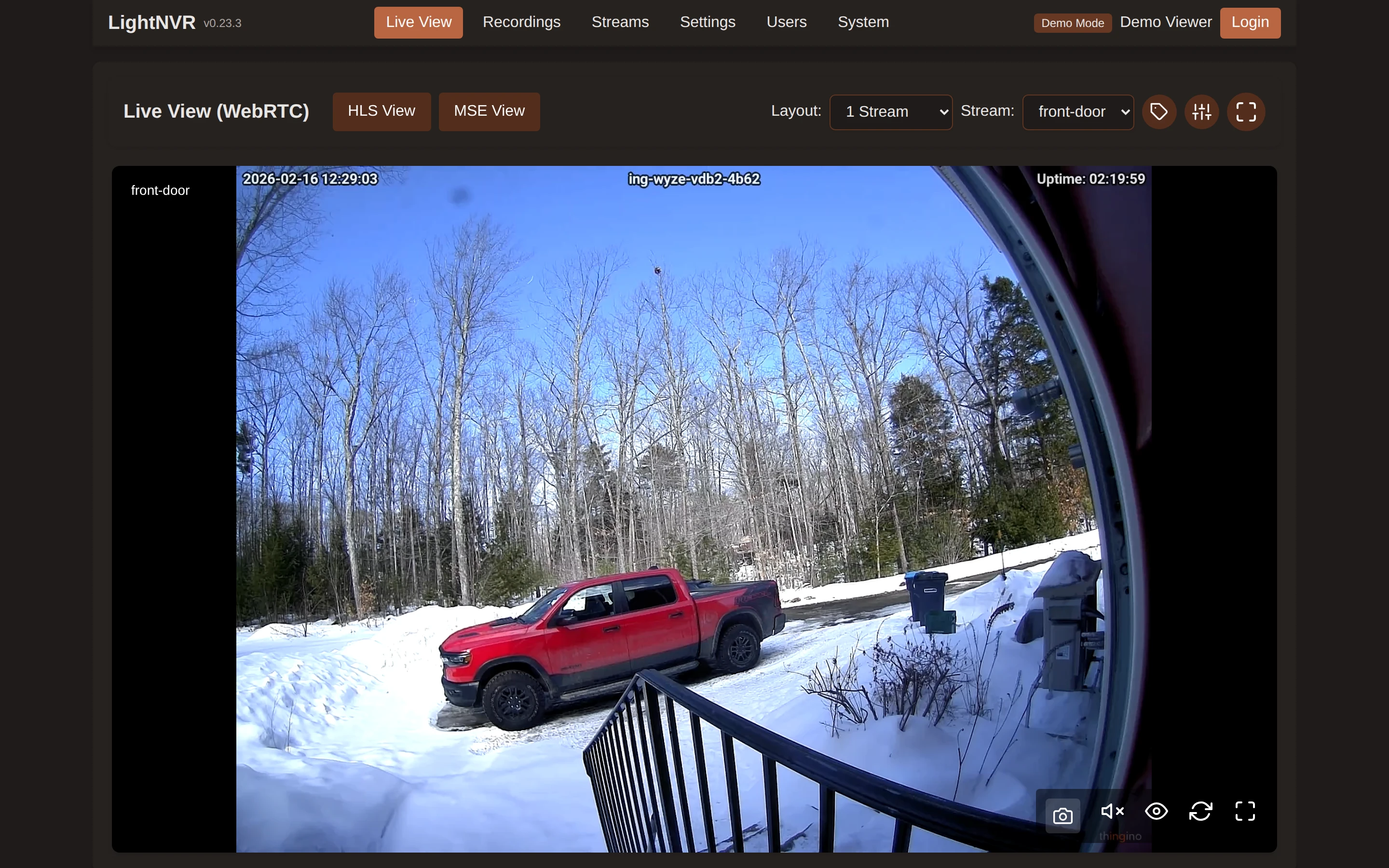
Real screenshots from a live instance — explore different views and themes.

🎥 Open Live Demo
matteius.lightnvr.com
Retro 80s · Dark
LightNVR Live View — Retro 80s theme
Theme:
Live Streams Recordings Full UI
60%
Cheaper than Verkada
100%
BYOC*
Bring Your Own Cameras
<50ms
Stream Latency†
99.5%
Uptime SLA

*Your cameras must support RTSP or ONVIF — open standards used by most professional IP cameras (Reolink, Hikvision, Dahua, Amcrest, etc.). Many consumer smart home cameras (Ring, Nest, Arlo) use proprietary protocols and are not compatible.
†Stream latency depends on your local network speed, camera encoding settings, and internet connection quality.

"After upgrading, all the Axis M10 Series cameras are now recording perfectly — clean MP4s, correct framerate (30fps), proper durations. Everything is working correctly now."
@DevlTz · GitHub Community
"Thank you for your explanation — it makes sense now. I appreciate it, excellent project."
@59zCez · GitHub Community
📷 Camera Compatibility

Works With Your Cameras

The common thread is RTSP and open standards. If your camera streams RTSP or speaks ONVIF, LightNVR can record it. We deliberately don't support proprietary closed protocols like Ring's, Arlo's, or Nest's native streams — those are designed to keep you locked into their ecosystem.

Reolink

RLC-810A, RLC-823A, E1 Pro, Duo 3 PoE

Excellent RTSP support out of the box

Amcrest

IP5M-T1179, ProHD, UltraHD series

ONVIF-compliant, budget-friendly

Lorex

4K PoE series, W882CAD, E891AB

US brand, full RTSP/ONVIF support

ANNKE

C800, NC400, I91BL series

Affordable, ONVIF-compliant

Foscam

R2C, G4P, FI9926P

Budget-friendly, standard RTSP

Hikvision

DS-2CD series, DS-2DE PTZ

⚠️ Not NDAA-compliant — consumer/commercial use only

Dahua

IPC-HDW, IPC-HFW series

⚠️ Not NDAA-compliant — consumer/commercial use only

Don't see your camera? Ask us — if it speaks RTSP, it almost certainly works.

🚀 Beta Testing Window — Limited Availability

Provision Your First Recording Server — No Charge

We're in our go-live testing window. Right now you can get a fully functional cloud recording server running with just two steps — no billing, no strings attached.

1 Sign our Terms of Service Review our legal docs — takes about 2 minutes
2 Submit a setup request Tell us your use case and how many cameras you have
3 We enable your account Usually within one business day — completely free
4 We check in after ~30 days Want to keep going? We set up a Stripe invoice. No auto-billing ever.

No credit card required. No automatic billing — ever. After your free month, we reach out personally. If you want to continue, we send a Stripe invoice. If not, no hard feelings.

Two Ways to Use LightNVR

LightNVR is free, open source software — run it yourself on your own hardware, or let us run it for you in the cloud. Same great software, two very different levels of effort.

Self-Hosted

Free forever

Download LightNVR and run it on your own computer, home server, or Raspberry Pi. Great if you're comfortable with a bit of tech setup and want full control.

  • Completely free and open source
  • Your data stays on your own hardware
  • Full customization and control
  • You manage installation, updates, and keeping it running
  • Recordings stored locally — if your hardware is stolen, damaged, or loses power, so are your recordings
View on GitHub

Cloud Hosted

From $20/mo

We run LightNVR for you in the cloud — whether you're securing one location or deploying for dozens of client sites. Connect your cameras and start recording. We handle everything.

  • We handle all setup, updates, and maintenance — no technical knowledge needed
  • Recordings stored safely off-site — protected even if your cameras are stolen, or there's a fire, flood, or power outage
  • Watch live and review past footage from any phone, tablet, or computer
  • Always recording — 99.5% uptime SLA, no local hardware to fail
  • No server hardware to buy or manage
See Pricing

How it fits together

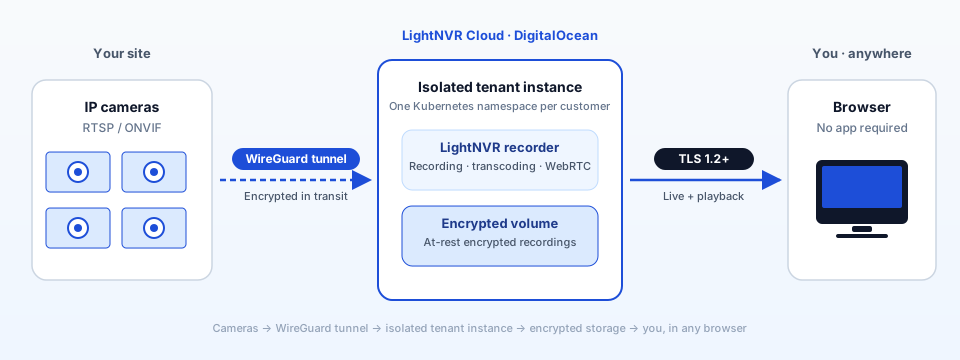
Cameras at your site connect over an encrypted tunnel to your own isolated tenant instance. Recordings stay encrypted at rest. You watch from any browser.

LightNVR architecture: cameras → WireGuard tunnel → isolated tenant instance → encrypted storage
Each customer gets a dedicated Kubernetes namespace — your recordings are never co-mingled.

Read the full architecture & security page →

Everything You Need

Professional security camera recording features — without the enterprise price tag or requirement to buy proprietary hardware.

Secure Private Tunnels

Cameras connect over an encrypted VPN (WireGuard) — no port forwarding or IT setup needed, even if your cameras are behind a home router or office firewall.

Bring Your Own Cameras

Works with most standard IP security cameras — Reolink, Hikvision, Dahua, Amcrest, and many more. No need to buy new or proprietary hardware.

Your Own Private Server

Every site gets its own dedicated recording server — footage is never mixed between accounts. Ideal for MSPs managing multiple client locations.

Watch From Any Browser

View live camera feeds on any phone, tablet, or computer — no app download required.

Cloud Recording

Continuous or motion-triggered recording stored safely off-site, with configurable retention periods.

Enterprise Security

All video encrypted in transit and at rest. SOC 2 compliance roadmap.

How We Compare

Same features, fraction of the cost. No proprietary hardware required.

Provider Price Notes
Ivideon $9-25/cam/mo Per-camera pricing adds up fast
Verkada $17-150/cam/mo Requires proprietary cameras
Rhombus $12+/cam/mo Annual contracts, hardware lock-in
LightNVR Best Value From $20/mo No per-camera fees, BYO cameras, pay for what you need

Simple, Flexible Pricing

Pay only for what you need — scale up or down any time.

1 vCPU
0.5 vCPU4 vCPU
1 GB
256 MB4 GB
50 GB
10 GB200 GB
Base Platform$9.00/mo
CPU Processing Power (1 vCPU)$16.00/mo
Memory (1 GB)$4.00/mo
Cloud Storage (50 GB)$15.00/mo
Total$44.00/mo
Unlimited cameras — no per-camera fees
Secure private connection for your cameras: $2/tunnel (add anytime)
Live browser streaming included
🚀 Get Started Free — $44.00/mo after trial

Create your account in 30 seconds. Free testing window — no credit card, no automatic charges.

Try the live demo first · No account needed

*No artificial camera limits. Actual capacity depends on resolution, frame rate, and encoding settings.
Resources above Starter (500m CPU, 512Mi RAM, 20GB storage) require billing setup after signup.

Or start from a fixed-price tier

If you'd rather not slide knobs, here are the three most common configurations as flat-rate plans. Same software, same isolation.

Starter

$25 /mo

A small allocation to try the workflow end-to-end.

  • 0.5 vCPU · 512 MB RAM · 20 GB recording
  • Roughly 2–4 cameras at 720p
  • WireGuard tunnel · isolated tenant
  • Drag the calculator on /pricing to fit
Start free trial
Most popular

Standard

$45 /mo

The most common starting point for a small site.

  • 1 vCPU · 1 GB RAM · 50 GB recording
  • Roughly 4–8 cameras at 1080p
  • WireGuard tunnel · isolated tenant
  • Drag the calculator on /pricing to fit
Start free trial

Professional

$80 /mo

A larger allocation for full-site or 4K deployments.

  • 2 vCPU · 2 GB RAM · 100 GB recording
  • Roughly 8–16+ cameras or 4K
  • WireGuard tunnel · isolated tenant
  • Drag the calculator on /pricing to fit
Start free trial
See full pricing

Larger deployment, multi-site, or compliance contract? Let's talk.

🛡️ Privacy & Data Protection

Built With Privacy as a Default

Security camera footage is sensitive. We've designed LightNVR Cloud so that keeping your data private isn't a premium add-on — it's how the system works by default.

Your footage stays yours

Every instance runs in a fully isolated Kubernetes namespace. Your recordings are never co-mingled with another customer's data — not even on the same volume.

Encrypted in transit, always

Camera traffic travels over WireGuard VPN — a modern, audited protocol with no legacy cipher baggage. Your dashboard and API are served exclusively over TLS 1.2+.

Open source core

LightNVR itself is open source. You can read exactly what runs on your server, build it yourself, or self-host entirely. No black boxes.

You choose where your data lives

Instances run in DigitalOcean datacenters. Pick the region closest to your cameras — or the one that satisfies your compliance requirements. We don't move your data without asking.

We don't scan your footage

We have no access to your recordings and run no AI analysis on them unless you explicitly opt into a feature that requires it. Your cameras, your business.

Delete means delete

When you terminate an instance, the PVC and all recordings are permanently deleted from our infrastructure. No soft-deletes, no 30-day retention on our end.

Have a specific compliance requirement (GDPR, SOC 2, HIPAA-adjacent)? Get in touch — we're happy to discuss your setup.

🏢 For Managed Service Providers

Deploy Camera Recording Across All Your Client Sites

If you manage security systems for multiple businesses, LightNVR Cloud fits the way you work. Spin up a dedicated, isolated recording server for each client — billed per site, not per camera. Scale up as you win new clients, without surprises on your invoice.

  • One platform, all your clients — manage every site from a single login
  • Per-site pricing, no per-camera fees — easy to bundle into your existing service contracts
  • Complete client isolation — each client gets their own private server; footage is never shared or mixed
  • Works with cameras your clients already own — no forced hardware upgrades or proprietary equipment
  • Multi-region ready — infrastructure built on DigitalOcean; we can expand to Amsterdam, Bangalore, San Francisco, or other DO regions with your clients
  • Volume pricing available — reach out if you're managing five or more sites

Why MSPs choose LightNVR

No per-camera fees
vs. $12–150/camera/mo with Verkada or Rhombus
Works with existing cameras
No need to replace hardware at client sites
Fully isolated per client
Each client's footage lives on their own private server

Expanding Your Footprint?

Our infrastructure is built on DigitalOcean and ready to grow with you — New York today, Amsterdam, Bangalore, or San Francisco tomorrow. If your clients need data kept in a specific region, let's talk .

🇺🇸 NYC1 — Live 🇳🇱 AMS3 — On request 🇮🇳 BLR1 — On request 🇺🇸 SFO3 — On request 🇨🇦 TOR1 — On request

Common Questions

If your question isn't here, email support@lightnvr.com — a real human responds.

Does it work with my camera?
If your camera streams RTSP or speaks ONVIF, yes. That covers the vast majority of IP cameras sold today — Reolink, Amcrest, Lorex, Axis, Hanwha, Hikvision, Dahua, and hundreds more. It also works with cameras running open-source Thingino firmware. We don't support proprietary closed protocols (Ring, Nest, Arlo native streams) — those vendors deliberately block third-party recording.
What is RTSP / ONVIF and why does it matter?
RTSP (Real-Time Streaming Protocol) is an open standard for streaming video — think of it as HTTP for camera feeds. ONVIF is an open standard for IP camera interoperability. Cameras that support these can work with any compatible recorder, not just the manufacturer's app. Cameras that only support proprietary protocols lock you into one vendor's ecosystem and pricing forever.
What if my cameras use Hikvision or Dahua firmware?
Those cameras work fine with LightNVR for commercial and personal use — they stream standard RTSP. The one caveat: they're not NDAA Section 889-compliant, so they can't be used in federal government deployments or by government contractors. For government use, see our NDAA-compliant camera list.
What happens to my recordings if I cancel?
You stay in control. The recommended sequence: suspend your instance from the dashboard (this freezes activity so nothing new is written while you work), download whatever recordings you want to keep from your dedicated storage volume, then terminate the instance when you're done. Termination releases the cloud resources back to the pool — at that point the encrypted volume and every recording on it are permanently deleted from our infrastructure, with no soft-delete and no silent retention on our end. If you forget to export first, contact us before terminating and we will pause the deletion long enough for you to grab what you need.
What happens if my internet goes down?
LightNVR records directly from your camera's RTSP stream over your local network or WireGuard VPN. If the internet between your camera and our servers drops, recording pauses for that window. Cameras that support SD card buffering can bridge short outages. For critical deployments, a local backup recorder alongside LightNVR Cloud is a good pattern.
How do I connect my cameras?
Two options: (1) WireGuard VPN — we generate a config you load onto your router or a Raspberry Pi at the camera site; your cameras' RTSP streams then flow privately to your LightNVR instance. (2) If your cameras are already on a network with internet access and have public RTSP URLs, you can point LightNVR directly at them. Setup takes 10–30 minutes for most sites.
How many cameras can I use per instance?
It depends on the resources you allocate, not on a per-camera ceiling. The Starter configuration (0.5 vCPU / 512 MB / 20 GB) typically handles 2–4 cameras at 720p. Standard (1 vCPU / 1 GB / 50 GB) typically handles 4–8 at 1080p. Professional (2 vCPU / 2 GB / 100 GB) typically handles 8–16+ or fewer at 4K. The pricing calculator lets you slide each control independently — more cameras just means more storage and a bit more CPU. Enterprise sizes above that with no fixed ceiling.
Is this GDPR / privacy regulation compliant?
LightNVR Cloud is hosted on DigitalOcean infrastructure. EU customers can request an AMS3 (Amsterdam) instance to keep footage in the EU; APAC customers can request BLR1 (Bangalore). We don't process, analyze, or share your footage. You control retention periods. For formal GDPR DPA agreements or specific compliance documentation, contact us and we'll work through it with you.
What exactly happens after the free trial month?
We reach out personally — no automated billing trigger, no surprise charge. If you want to continue, we send a Stripe invoice for the plan you've been on. If you don't want to continue, your instance is shut down and data deleted. There is no automatic renewal and no credit card ever required to start.
Do I need to install anything on my own servers?
No. LightNVR runs entirely in our infrastructure. The only thing you might install is a WireGuard client on your local router (to connect your cameras privately) — that's optional, and we provide the config. There's nothing to maintain, update, or host on your end.

Still have questions? Email us — a real human responds.

Ready to Get Started?

Start recording your security cameras in the cloud — no per-camera fees, no new hardware required.

No credit card required · Create account in 30 seconds · Free testing window open now